Imagine you could turn a single USDC deposit into a diversified crypto basket, or consolidate five dust tokens into one stablecoin, all without leaving the MasterDEX interface. In 2026, MasterDEX’s Multiswap makes that possible on the Base chain with a single click. This guide walks you through every step, from wallet setup to fee optimization, so you can start trading multi‑token baskets instantly.
Table of Contents:
ToggleKey Takeaways
- Multiswap executes a 1‑to‑5 or 5‑to‑1 basket swap in one atomic transaction.
- Zero platform fees – you only pay underlying DEX fees and Base gas.
- Slider‑based allocation guarantees percentages always sum to 100 %.
- MEV protection and live price‑impact preview reduce slippage risk.
- Available exclusively on Base, supporting all Base‑native tokens.
Quick Answer
To trade on MasterDEX Multiswap, connect a Base‑compatible wallet, fund it with the input token, open the Multiswap panel, set your basket allocations with the sliders, review price impact, and confirm the single‑transaction swap. The platform routes the trade through its 90+ DEX aggregator, charging only standard protocol fees.
Understanding MasterDEX Multiswap
MasterDEX’s Multiswap is a bidirectional basket‑swap primitive that lives on the Base chain. Unlike a traditional swap that moves one token to another, Multiswap lets you:
- Buy basket: Spend one token (e.g., USDC) and split it across up to five target tokens in a single transaction.
- Sell basket: Consolidate up to five tokens you already hold into one output token (e.g., USDC) to clear dust or take profit.
The feature is built on MasterDEX’s zero‑fee swap aggregator, which scans 90+ DEXs across five chains to find the best route for each leg of the basket. Because the whole operation is atomic, either all legs succeed or the transaction reverts, protecting you from partial fills.
Prepare Your Wallet
Before you can use Multiswap, you need a wallet that supports the Base network. MetaMask, Trust Wallet, and Coinbase Wallet all have native Base support as of early 2026. Follow these steps to get ready:
- Install the wallet extension or mobile app.
- Add the Base network (RPC URL:
https://base-mainnet.g.alchemy.com/v2/your-api-key). - Transfer a small amount of BASE (≈0.001 BASE) for gas.
- Deposit the token you plan to swap (e.g., USDC) into the wallet.
Risk warning: Swapping large amounts can cause noticeable price impact on thinly‑liquified pairs. Always test with a small amount first.
Open the Multiswap Panel
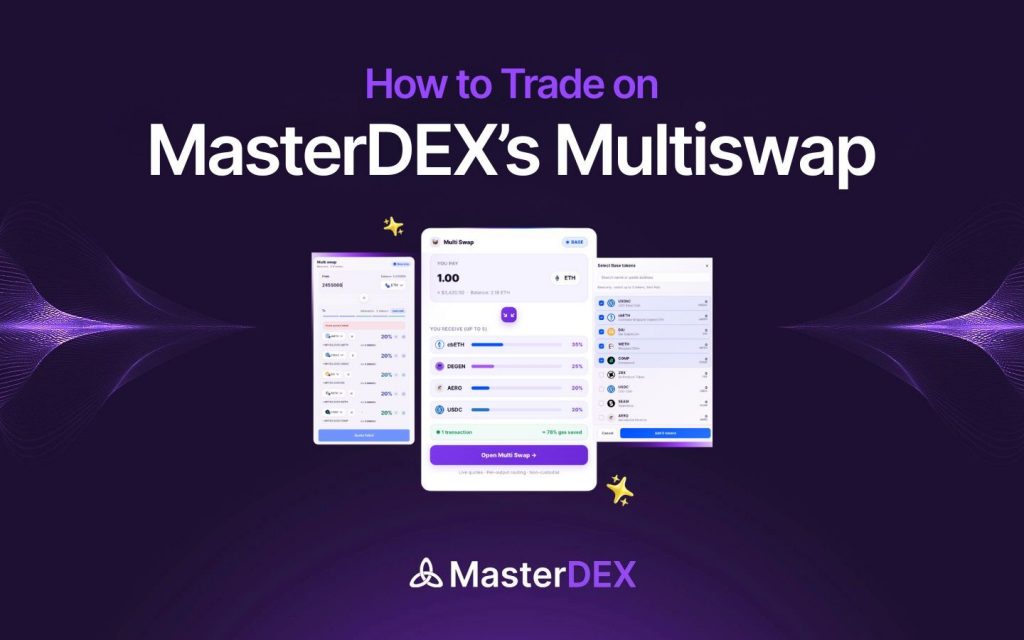
Navigate to MasterDEX and click the “Swap” dropdown, then select “Multiswap”. The UI displays two tabs: “Buy Basket” and “Sell Basket”. The design is intentionally minimalist—no extra pages, just a single screen where you can flip the direction with a bidirectional arrow.
Configure a Buy Basket (1 → 5)
Suppose you want to allocate $1,000 USDC across ETH, SOL, MATIC, APE, and MDEX. Here’s how:
- Select USDC as the “From” token.
- Enter the total amount (e.g., 1,000 USDC).
- In the target column, add the five tokens you want.
- Use the sliders to set each token’s percentage. The platform automatically adjusts the others to keep the total at 100 %.
- Observe the live price‑impact gauge. If it exceeds your tolerance, enable the “Limit Order” toggle to set a maximum slippage (default 0.5 %).
When you’re satisfied, click the blue “Swap” button. Your wallet will prompt a single signature, after which MasterDEX routes each leg through the optimal DEX (e.g., Uniswap V4 on Base for ETH, Orca on Solana for SOL via the cross‑chain bridge, etc.).
Configure a Sell Basket (5 → 1)
A sell basket is ideal for clearing dust or rotating into a stable asset. To consolidate 0.2 ETH, 15 SOL, and 200 MATIC into USDC:
- Switch to the “Sell Basket” tab.
- Select each token you hold as an input, specifying the exact amount you wish to swap.
- Choose USDC as the output token.
- Optionally set individual slippage limits for each leg (advanced mode).
- Review the aggregated price‑impact and confirm the transaction.
Optimize Fees and Slippage
Even though MasterDEX charges zero platform fees, you still pay the underlying DEX protocol fees and Base gas. Here are three tactics to keep costs low:
- Swap during off‑peak hours: Base gas prices dip below 1 gwei between 02:00–04:00 UTC.
- Use limit orders for large baskets: Setting a 0.3 % max slippage can prevent unexpected price drift.
- Leverage the “Cross‑Margin” mode (available in PerpDEX) to offset exposure when you plan to hedge your basket with futures.
| Feature | Multiswap | Standard Swap |
|---|---|---|
| Direction | 1‑to‑5 or 5‑to‑1 (basket) | 1‑to‑1 |
| Transaction Count | Single atomic tx | One tx per pair |
| Fee Structure | Zero platform fee | Zero platform fee |
| Slippage Control | Per‑leg limit order | Global slippage |
| Supported Chains | Base only (Base‑native tokens) | Multi‑chain (5 chains) |
Monitor and Manage Your Basket
After the swap, MasterDEX automatically adds the new tokens to your Portfolio Tracker. You can:
- Set price alerts for each basket component via the Explorer’s watchlist.
- Track P&L in real time across all Base assets.
- Re‑balance the basket later using the same Multiswap UI.
For deeper analytics, explore the AI‑powered search on the DEX Explorer, which can surface historical whale activity for the tokens you just acquired.
Frequently Asked Questions
Can I use Multiswap on other chains besides Base?
Currently, Multiswap is exclusive to the Base chain. The feature relies on Base‑native token contracts and the on‑chain routing logic that is not yet deployed on other networks.
What happens if one leg of my basket fails?
Because the swap is atomic, the entire transaction reverts if any leg cannot be fulfilled within the slippage parameters. This protects you from ending up with an incomplete basket.
Do I need to approve each token before swapping?
Yes. The first time you swap a particular token on MasterDEX, you’ll be prompted to grant an ERC‑20 allowance. Subsequent swaps of the same token use the existing approval, saving gas.
Is there a limit to the total value I can swap?
MasterDEX imposes no hard caps, but extremely large orders may hit liquidity limits on individual DEXs, increasing price impact. Splitting the trade or using limit orders can mitigate this.
How does MasterDEX protect against MEV?
All Multiswap routes are processed through MasterDEX’s MEV‑shielded router, which randomizes execution order and adds a small time‑delay to reduce front‑running opportunities.
Conclusion – Start Swapping with MasterDEX Multiswap Today
MasterDEX Multiswap removes the friction of manual basket creation, giving you a single‑click path to diversified exposure or efficient dust consolidation on Base. By following the steps above, you’ll benefit from zero platform fees, MEV protection, and real‑time price‑impact analytics. Ready to test the feature?
Launch MasterDEX Multiswap now and create your first basket trade.
Written by MasterDEX Team
The MasterDEX editorial team covers crypto, DeFi, staking strategies, and blockchain technology.